This blog contains experience gained over the years of implementing (and de-implementing) large scale IT applications/software.

Complications of using SAP ASE 16.0 in a HADR pair plus DR node Setup

Firstly, we need to clarify that HADR in SAP ASE speak, is the SAP ASE feature-set name for a HA or DR setup consisting of 2 SAP ASE database instances with a defined replication mode.

The pair can be either for HA or DR, but rarely both, due to the problem of latency.
The problem of latency is inverse to the solution of DR. The further away your second datacentre, the better, from a DR perspective.
Conversely, the worse your latency will become, meaning it can only seriously be used for DR, and not for HA.

If you can find a sweet spot between distance (better for DR) and latency (better for HA), then you would have a HADR setup. But this is unlikely.

As of ASE 16 SP03, an additional DR node is supported to be incorporated into a HADR pair of ASE database instances.
This produces a 3 node setup, with 2 nodes forming a pair (designed to be for HA), then a remote 3rd node (designed for DR).
The reason you may consider such a setup is to provide HA between the two nodes, maybe within an existing datacentre, then DR is provided by a remote 3rd node.
Since the two nodes within the HA pair would likely have low latency, they would have one replication mode (e.g synchronous replication) keeping the data better protected, with the replication mode to the third database being asynchronous, for higher latency scenarios, but less protected data.

In the scenarios and descriptions below, we are highlighting the possibility of running a two node HADR pair plus DR node in public cloud using a paired region:
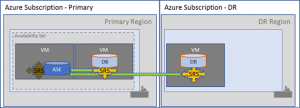
Whilst an SAP application layer is also supported on the 3 node setup, there are complications that should be understood prior to implementation.
These complications will drive up both cost of implementation and also administrative overhead, so you should ensure that you fully understand how the setup will work before embarking on this solution.

Setup Process:

We will briefly describe the process for setting up the 3 nodes.
In this setup we will use the remote, co-located replication server setup, whereby the SAP SRS (replication server) is installed onto the same servers as the ASE database instances.

1, Install primary ASE database instance.

2, Install Data Movement (DM) component into the binary software installation of the primary ASE database instance.

3, Install secondary ASE database instance.

4, Install Data Movement (DM) component into the binary software installation of the secondary ASE database instance.

5, Run the setuphadr utility to configure the replication between primary and secondary.

This step involves the materialisation of the master and <SID> databases. The master database materialisation is automatic, the <SID> database is manual and requires dump & load.

Therefore, if you have a large <SID> database, then materialisation can take a while.

6, Install tertiary ASE database instance.

7, Install Data Movement (DM) component into the binary software installation of the tertiary ASE database instance.

8, Run the setuphadr utility to configure the tertiary ASE instance as a DR node.

This step involves the materialisation of the master and <SID> databases. The master database materialisation is automatic, the <SID> database is manual and requires dump & load.
Therefore, if you have a large <SID> database, then materialisation can take a while.

In the above, you can adjust the replication mode between primary and secondary, depending on your latency.
In Public cloud (Microsoft Azure), we found that the latency between paired regions was perfectly fine for asynchronous replication mode.
This also permitted the RPO to be met, so we actually went asynchronous all the way through.

POINT 1:

Based on the above, we have our first point to make.

When doing the dump & load for the tertiary database, both master and <SID> databases are taken from the primary database, which in most cases will be in a different datacentre, so materialisation of a large <SID> database will take longer than the secondary database materialisation timings.

You will need to develop a process for quickly getting the dump across the network to the tertiary database node (before the transaction log fills up on the primary).

Developing this fast materialisation process is crucial to the operation of the 3 node setup, since you will be doing this step a lot.

Operational Process:

We now have a 3 node setup, with replication happily pushing primary database transactions from primary (they go from the Replication Agent within the primary ASE instance), to the SRS on the secondary ASE node.
The SRS on the secondary instance then pushes the transactions into the secondary ASE instance databases (master & <SID>) and also to the SRS on the tertiary ASE database instance.

While this is working, you can see the usual SRS output by connecting into the SRS DR Agent on the secondary node and issuing the “sap_status path” command.
The usual monitoring functions exist for monitoring the 3 ASE nodes. You can use the DBACockpit (DB02) in a Netweaver ABAP stack, the ASE Fault Manager or manually at the command line.

One of the critical processes with an ASE HADR setup, is the flow of transactions from primary. You will be constantly engaged trying to prevent the backlog of transactions, which could cause primary to halt database commits until transaction log space is freed.
By correctly sizing the whole chain (primary, secondary and tertiary transaction logs) plus sizing the inbound queues of the SRS, you should have little work to do on a daily basis.

POINT 2:

It’s not the daily monitoring that will impact, but the exceptional change scenarios.
As an example, all 3 ASE database instances should have the same database device sizes, transaction log sizes and configuration settings.
Remembering to increase the device, database, transaction log, queue on each of them can be arduous and mistakes can be made.
Putting a solid change process around the database and SRS is very important to avoid primary database outages.
Since all 3 databases are independent, you can’t rely on auto-growby to grow the devices and databases in sync. So you may need to consider manually increasing the device and database sizes.

Failover Process:

During a failover, the team need to be trained in the scenario of recovery of the data to whichever database server node is active/available/healthy.
The exact scenario training could be difficult as it may involve public cloud, in which case it may not be possible to accurately simulate.
For the 3 node SAP ASE HADR + DR node, the failure scenario that you experience could make a big difference to you overall recovery time.

When we mention recovery time, we are not just talking about RPO/RTO for getting production systems working, we are talking about the time to actually recover the service to a protected state.
For example, recovery of the production database to a point where it is once again adequately protected from failure through database replication.

Loss of the primary database in a 3 node setup, means that the secondary node is the choice to become primary.
In this scenario, the secondary SRS is no longer used. Instead the SRS on the DR node would be configured to be the recipient of transactions from the Replication Agent of the secondary ASE.
If done quickly enough, then re-materialisation of the tertiary database can be avoided as both secondary and tertiary should have the same point-in-time.
In practice however, you will find more often than not, that you are just re-materialising the DR node from the secondary.
In some cases, you may decide not to both until the original primary is back in action. The effort is just too much.

Loss of the secondary database in a 3 node setup, means that the primary becomes instantly unprotected!
Both the secondary node and the tertiary node will drift out of sync.
In this scenario, you will more than likely find that you will be pushed for time and need to teardown the replication on the primary database to prevent the primary transaction lo filling.

Loss of the tertiary database in a 3 node setup, means that you no longer have DR protection for your data!
The transaction log on the primary will start to fill because secondary SRS will be unable to commit transactions in the queue to the tertiary database.
In this scenario, you will more than likely find that you will be pushed for time and need to re-materialise the DR database from the primary.
Time will be of the essence, because you will need transaction log space available in the primary database and queue space in the SRS, for the time to perform the re-materialsation.

POINT 3:

Sizing of the production transaction log size is crucial.
The same size is needed on the secondary and tertiary databases (to allow materialisation (dump & load) to work.
The SRS queue size also needs to be a hefty size (bigger than the transaction log size) to accommodate the transactions from the transaction log.
The primary transaction log size is no longer now just about daily database transactional throughput, but is also intertwined with the requirement for the time it takes to dmp & load the DB across the network to the DR node (slowest link in the chain).
Plus, on top of the above sizings, you should accommodate some additional buffer space for added delays, troubleshooting, decision making.

You should understand your dump & load timings intricately to be able to understand your actual time to return production to a protected state. This will help you decide which is the best route to that state.

Maintenance Process:

Patching a two node ASE HADR setup, is fairly simple and doesn’t take too much effort in planning.
Patching a three node setup (HADR + DR node), involves a little more thought due to the complex way you are recommended to patch.
The basics of the process are that you should be patching the inactive portions of the HADR + DR setup.
Therefore, you end up partially patching the ASE binary stack, leaving the currently active primary SRS (on the secondary node) until last.
As well patching the ASE binaries, you will also have to patch the SAP Hostagent on each of the three nodes. Especially since the Hostagent is used to perform the ASE patching process.
Since there is also a SAP instance agent present on each database node, you will also need to patch the SAP Kernel (SAPEXE part only) on each database node.

POINT 4:

Database patching & maintenance effort increases with each node added. Since the secondary and DR nodes have a shared nothing architecture, you patch specific items more than once across the three nodes.

Summary:

The complexity of managing a two node SAP ASE HADR pair plus DR node should not be underestimated.
You can gain the ability to have HA and DR, especially in a public cloud scenario, but you will pay a heavy price in overhead from maintenance and potentially lose time during a real DR due to the complexity.
It really does depend on how rigid you can be at defining your failover processes and most importantly, testing them.

Carefully consider the cost of HA and DR, versus just DR (using a two node HADR setup with the same asynchronous replication mode).
Do you really need HA? Is your latency small enough to permit a small amount of time running across regions (in public cloud)?

CORS in a SAP Netweaver Landscape

In this brief article I’m going to try to simplify and articulate what Cross-Origin Resource Sharing (CORS) is, how it works and how in an SAP environment (we use Fiori in our example) we can get around CORS without the complexity of rigidly defining the resource associations in the landscape.

Let’s Look At What CORS Is:

Fundamentally CORS is a protection measure introduced in around 2014 inside Web browsers, to try and prevent in-browser content manipulation issues associated with JavaScipt accessing resources from other websites without the knowledge/consent of the Web browser user.

You may be thinking “Why is this a problem?”, well, it’s complex, but a simple example is that you access content on one Web server, which uses JavaScript to access content on another Web server.  You have no control over where the JavaScript is going and what it is doing.
It doesn’t mean the other Web server in our example, is malicious, it could actually be the intended victim of malicious JavaScript being executed in the context of the source Web server.

What Does “Consent” Mean?

There is no actual consent given by the Web browser user (you). You do not get asked.

It is more of an understanding, built into the Web browser which means the Web browser knows where a piece of JavaScript has been downloaded from (its origin), versus where it is trying to access content from (its target), and causes the Web browser to seek consent from the target Web server before allowing the JavaScript to make its resource request to the target.

A simple analogy:
Your parents are the Web browser.
You (the child) are the untrusted JavaScript downloaded from the source Web server.
You want to go and play at your friend’s house (the target Web server).
Your parents contact your friend’s parents to confirm it’s OK.
Your parents obtain consent for you to go and play and the type of play you will be allowed to perform, before they let you go and play at your friend’s house.

Based on the simple analogy, you can see that the Web browser is not verifying the content on the target, neither is it validating the authenticity of the target (apart from the TLS level verification if using HTTPS).
All the Web browser is doing, is recognising that the origin of the JavaScript is different to its target, and requesting consent from the target, before it lets the JavaScript make it’s resource request.

If the target Web server does not allow the request, then the Web browser will reject the JavaScript request and an error is seen in the Web browser JavaScript debugger/console.

What Does “Accessing” Mean?

When we talk about JavaScript accessing resources on the target Web server, we are saying that it is performing an HTTP call (XML HTTP), usually via the AJAX libraries using one of a range of allowed methods. These methods are the usual HTTP methods such as GET, PUT, POST, HEAD etc.

What is the flow of communication between origin Web server, Web browser and target Web server?

Below I have included a diagram that depicts the flow of communication from a user’s Web browser, between a Fiori Front-End Server (FE1) and a Back-End SAP system (BE2).

In the example, pay attention to the fact that the domain (the DNS domain) of the FE1 and BE2 SAP systems, are different.

So, for example the FE1 server could be fe1.group.corp.net and the BE2 server could be be2.sub.corp.net.

1, The user of the Web browser navigates within Fiori to a tile which will load and execute a JavaScript script from FE1.

2, The JavaScript contains a call to obtain (HTTP PUT) a piece of information into the BE2 system via an XML HTTP Request (XHR) call inside the JavaScript.

3, The user’s Web browser detects the JavaScript’s intention and sends a pre-flight HTTP request to the BE2 system, including the details about the origin of the JavaScript and the HTTP method it would like to perform.

4, The BE2 system responds with an “allow” response (if it wishes to allow the JavaScript’s request).

5, The Web browser permits the JavaScript to make its request and it sends it’s HTTP request to BE2.

What Needs to Be Configured in BE2?

For the above situation to work, the BE2 system needs to be configured to permit the required HTTP methods from JavaScript on the origin FE1.

This means that a light level of trust needs to be added to configuration of BE2. This is documented in SAP notes and help.sap.com for NW 7.40 onwards.

Is There a Simpler Way?

An alternative method to configuring Netweaver itself, is to adjust the ICM on the target (BE2) to rewrite the inbound HTTP request to add a generic “origin” request. This means you can have many domains making the access request, without needing to maintain too much configuration at the cost of security.
I’m thinking more about what needs to be done, not just in production, but it in all DEV, TST and PrePRD systems, plus config re-work after system copies.
Not only this, but it would be difficult for your URL rewrite to be accurate, so it may end up being applied to all URL accesses, no matter where they come from.  This will impact performance of the Web Dispatcher.
You could solve the performance issue by using a different front-end IP address (service name) for your Web Dispatcher, which is used specifically for requests from your origin system (FE1).  Another option could be (if it’s your own code being called in BE2) to apply a URL path designation e.g. “/mystuff/therealstuff”, whereby the ICM on BE2 can match based on “/mystuff” and rewrite the URL to be “/therealstuff”.

How About an Even Simpler Way?

A much better way, which solves the CORS problem altogether and removes the need to place config on individual systems, is to front both the origin and the target behind the same Web Dispatcher.

This way, CORS becomes irrelevant as the domain of the Web Dispatcher is seen by the Web browser, as both the origin and the target.

To enable the above configuration, we need to ensure that we align the Web Dispatcher DNS domain to either the origin or the target.
It has to be aligned to whichever system we use the message server to load balance the HTTP call. This is a SAP requirement.

For the other back-end server (behind the Web Dispatcher), we use the EXTSRV option of the Web Dispatcher to allow it to talk to the BE2 system.
This has the capability of supplying multiple servers for HA and load balancing (round-robin).   It also means the DNS domain of that system can be different to that of the Web Dispatcher’s.

SAP ABAP Kernel SNAPSHOTS

If you haven’t already seen it, quite some time ago I wrote a brief blog post on the Flight Recorder for the NW AS Java stack.
Many years later, I’ve still very rarely seen a company use the flight recorder information.
Snapshots (also known as SAP Kernel Snapshot) in the NW AS ABAP stack are much the same thing.

When a serious condition occurs within the ABAP stack, a system message is registered in the system log (SM21) and a snapshot of the current system status is generated.
An example condition could be that a work process has died without warning, or that there was a lack of resources (background or dialog), hard shutdown of the SAP system/server or that the dispatcher queue was full.

Each of these scenarios is logged under system log message code “Q41”, in category “DP” and “Process No” “000”.
The only difference between the failures is the text following “reason: “ which is passed in by the calling Kernel function.

Q41 in system log

According to the SAP notes, the initial feature was provided in 2013 as per SAP note: 1786182 “CreateSnapshot: Collecting developer traces using sapcontrol”.
It was provided as an additional set of web service functions on the SAP instance agent (sapstartsrv) and is therefore accessible from outside of the SAP system if need be.

Originally, it appears to have been designed to be operated independently outside the SAP system, however SAP note 2640476 – “How to analyze Server Snapshot with kernel snapshot analyser” from 2019, indicates that it was integrated into the SAP Kernel in 7.40 (i.e. that the Kernel itself can instigate the snapshot).

How can we use SNAPSHOTS?

You can either access the snapshot zip files directly on the O/S level using O/S commands to extract and inspect the files, or you can use the ABAP transaction code SNAPSHOTS to see an ALV list of snapshot files.

In the O/S the files are stored in /sapmnt/<SID>/global/sapcontrol/snapshots.

Usually, the sequence of access is dictated by an extraordinary event within the ABAP stack, then you may see the System log entry which will inform you of the existence of a snapshot, but you may choose to regularly check in SNAPSHOTS anyway as part of your daily checks.

SNAPSHOTS (program: RS_DOWNLOAD_SNAPSHOTS)

As you can see the ABAP transaction incorporates the reason for the snapshot, whereas the O/S file listing is not so easy to identify.
If you want to use the O/S level, then unzipping the file will reveal a file called “description.txt” which states the reason for the snapshot:

From the SNAPSHOTS transaction (program RS_DOWNLOAD_SNAPSHOTS) you have the option to download the snapshot file to your front-end.
Here you can unzip the file and expose the contents.

Once you have extracted the snapshot zip file, you will see a tree structure under which will sit a number of XML files:

The names of the XML files are fairly self explanatory.
ABAPGetWPTable for example, is the name of the sapcontrol web service function that is used to get the ABAP Work Process Table (same as transaction SM50).

Opening any of the XML files is going to be a lot easier with Microsoft Excel.
Except the XML is not suitable for Excel without a little bit of manipulation (this is a real pain, but once in Excel you will love it).

Edit the XML file in a text editor and delete the header lines that are the result of the web service function call, leaving just the raw XML:

Save the file and then it will happily open in Excel!

As mentioned, this is a snapshot of the work process table at the point when an issue occurred.
Very useful indeed.
You have lots of other XML files to examine.

Plus, as an added bonus, further down the directory structure of the snapshot zip file, is a complete XML snapshot of all the developer trace files for this app server:

How can we manually create SNAPSHOTS?

You can manually create and administer the snapshots (they will need clearing down) using the SAP instance agent (sapcontrol) web service commands as follows:

sapcontrol -nr <##> -function [snapshot_function]
  CreateSnapshot [<description> [<datcol_param> [<analyse_severity -1..2>
  [<analyse_maxentries> [<analyse_starttime YYYY MM DD HH:MM:SS>
  <analyse_endtime YYYY MM DD HH:MM:SS> [<maxentries>
  [<filename1> … <filenameN>]]]]]]]
  ReadSnapshot <filename> [<local filename>]
  ListSnapshots
  DeleteSnapshots <filename1> [<filename2>… <filenameN>]

The ABAP transaction SNAPSHOTS only allows you to view/download and delete the snapshots. You can not trigger them using any standard transaction that I can find.

What was at SAP Inside Track Maidenhead 15/03/19

On Friday 15th, I went to the SAP Inside Track event at SAP Objects House in Maidenhead.
The SAP Inside Track is a SAP community organised event showcasing some of the latest SAP thinking and technology, but more importantly, connecting the SAP community with each other.
It is not an official event, which means it is nice and social.

The agenda was shaped as a figure of eight, with the event starting together in one room, then splitting into two or three rooms catering for different topics.
It rejoined for lunch and then split out once more before rejoining for the final talks of the day.

The keynote was presented by Maggie Buggie – Global Head of SAP Innovation Services.
SAP Innovation Services is a fairly recent department that spearheads new technological propositions from industry and leads into full development and the usual SAP software life-cycle process.
Maggie presented a couple of her favourite SAP customer stories including Signify (the recent rebrand of Phillips Lighting).
The aim was to showcase the tight coupling of SAP Innovation Services with customer requirements, producing great things.

After the keynote I stayed for a talk by Marta Velasco discussing “Generations X, Y or Z”.
Marta discussed how different generations of people have different uses of and for technology in their lives and how the environment and technology available during the lives of those generations, shapes society.
We heard a number of interesting points regarding influencers in today’s social media (including the perceived definition of an influencer).
It was fair to say that the audience tended to be aged towards the older generations, which is itself an interesting topic that SAP should take away regarding the audience of these future Inside Track events.
Is SAP on-trend, or is it seen as “old-news”?  What is the likely uptake of SAP technology from new up & coming businesses run by younger generations?

After a quick caffeine intake (another opportunity to network), I sat in on the presentation by Bartosz Jarkowski on how Microsoft Azure is making running SAP even easier.
There were two main areas that he demonstrated.
Configuring Azure AD to provide single-sing-on for SAP Netweaver based systems that can consume SAML (i.e. web based systems).
This was a super simple setup and involved configuring the Azure AD service inside the Azure Portal, then creating the necessary config in the SAP system (in transaction SAML) to hook into the Azure AD web services during the logon process.
The second interesting topic was the use of Azure Logic Apps to provide integration services for SAP systems.
An example provided was connecting a Netweaver ABAP stack to Azure Logic Apps via HTTP.  The SAP system would produce an IDoc and send it (WE19 – test IDoc) to the Azure Logic App via SOAP which would process the IDoc information and send it back inbound to the SAP system for inbound processing.
The configuration and setup of the Azure Logic Apps was not part of the discussion, but it looked fairly graphical.
The future use cases of this are vast and in the majority of the cases, it will remove the need for middleware.  Instead, moving the integration into the Azure fabric itself.
Any future uptake of this service would need to be careful not to mix business logic with the integration layer.  Otherwise a fairly confused layer of technology will emerge whereby point-to-point integration will be normal practice.

I took part in the “birds-of-a-feather” round-table discussion on ES6 features for functional programming in JavaScript, hosted by DJ Adams.
I’ve done a little JavaScript in my career, but nothing that would declare me anywhere near expert level, which is clearly where the co-host DJ Adams was from.
I’d never heard the session title “birds-of-a-feather” used before, but apparently this is a way of describing a small two-way interaction of discussing a technical topic.
We discussed what ES stood for (ECMA Script) and the basic idea behind functional programming, which lead us on a windy road trip of discussion around programming without variables, composition and decomposition of functions, modularisation and de-modularisation of subroutines and programs.
I have to say it was pretty in-depth, which I really enjoyed.
Will I be using the knowledge, probably.  I’ve written a Google Chrome Extension in JavaScript and that was interesting.  It could make use of functional programming techniques.

During the lunch break-out session, I did a bit of networking and got talking to an SAP customer using native SAP HANA for near-realtime risk analysis of financial transactions.
They have written their application to run on the XSA of the HANA Enterprise Edition, and using HANA as the main processing engine (with a little bit of persistence).
It was their first Inside Track event and they were interested to see how the SAP community worked.

After the lunch break, the agenda split once again into 2 rooms.
I decided I needed something less technical (after the ES6 discussion) so opted for the “Mindful or mind-full” talk by Sarah Ross, on why employee health data is important.
Sarah explained some of the benefits that a knowledgeable HR system can provide for employees and help the business meet productivity objectives.
We talked about the importance of employee health, but we also discussed how some items of health may not be directly related to the work environment.
We also talked about the fine line between better data collection and GDPR.
As technology improves, I think we agreed that the future employees will be much better looked after, empowered and managed, but they may have to give up some of what they may today perceive as private information.
In a rather blunt (and pessimistic) way, I tried to make a point that every company would love to put a value on every employee.  This would make the workplace fairer because fairness is a hot topic (pay equality) and invokes stresses in teams that are hard to measure.
It’s possible that this could be done in a clever way in the future, but for now, it really is a grey line due to today’s Human Rights and restrictions on employer monitoring or employees.

Another round of coffee and one (or two) repeats of the nice chocolate brownies from lunch.
This time I got talking to an MBA graduate who was looking for his next role and was interested to see what SAP offers.
He was primarily looking at technology sales roles (maybe pre-sales).
It was interesting to hear his perception of SAP as being a big software company but rarely on the graduate’s hipster list of “I would” like to work for them.

and we were back into another session.
The talk was by Tom Wagstaff and Sukhil Patel of charity Datakind, on the power of data science in the charity sector.
They started by talking about the way in which DataKind runs 3 different levels of interaction with charity clients, one being the “DataDive” weekends which involves a “flash-mob” style approach to data science!
On a “DataDive” weekend a large number of data science volunteers get together to cunch the numbers and seek to provide useful output for the charity, from it’s pre-provided data.
They explained that the process usually begins with a large CSV data dump, about 6 weeks of data cleansing and then finally the “DataDive” weekend.
The talk introduced some of their many successes in helping charities to better use their data-sets collected during the usual course of the charity’s business.
An example was working with a Lancashire Woman’s charity to help the charity understand the impact it is making and how it can improve service provision, for better outcomes.
The output from the “DataDive” weekend was able to help provide deeper insights into the reliability of the treatments that the Woman’s charity provided.
One of the points highlighted by the DataKind team, was that data collection was always an issue.
As part of the consultation process, they always advise clients on how best to reliably collect data for efficient ingestion and use.
Tom stated that the “free text” feedback fields were almost always unuseable as they often contained data that would fall foul of GDPR rules during the annonymisation process.
This was an interesting revelation, and would probably be the case for almost every survey I have ever completed.
The problem is that it’s free text and so people can put telephone numbers, email addresses and other personal details, which are difficult to filter out.

The final talk of the data (for me – it was a long drive), was by Dr Darren Hague on the SAP Data Science and Machine Learning Platform.
This was the latest evolution of SAP’s pre-packaged ML engine married with a comprehensive set of analaytical reporting capabilities in much the same way that Data Hub works today.
This provided some great insight into the re-positioning that sometimes goes in within SAP product teams, in response to market demand.
Let’s hope we hear more soon.

I finished the day at this point, although there was one more “birds-of-a-feather” on the previous topic.
It was good to catch-up with ex-colleagues, meet new people and discuss things that I rarely discuss.
I remember as an IT apprentice that the ability to rotate around different IT teams gave the apprentice the ability to see interconnections that no other pigeon-holed employee would ever see.
If you’ve ever wondered what goes on at these events, just go along.  It’s FREE and you’ll be amazed at the vastness of expertise within the SAP software space.

SAP Netweaver AS Java 7.50 End of Maintenance

If you’re a green-field or brown-field SAP customer and you will be deploying on-premise, you may well have a capability requirement to deploy Adobe Document Services for your SAP estate.
This is usually the case if you will be creating professional PDF documents, for example, for invoicing or payslips.

If you do have this requirement, then you need to be aware of the up & coming end of mainstream maintenance for SAP Netweaver AS Java 7.50.
You see, normally, the end of mainstream maintenance of SAP Netweaver based products is no big deal, you can always pay the extra cost for an extension to your maintenance agreement.  This is quite nicely titled “Extended Maintenance”.  Neat.
However, like the sub-title to a never ending action movie trilogy, “this time it’s different.”
SAP have definitively stated in SAP note 1648480 that there will be no extended maintenance for Netweaver AS Java 7.50!

Application Server Java within SAP NetWeaver 7.50 will be supported in mainstream maintenance to end of 2024. Extended maintenance will not be offered.

The SAP product availability matrix (PAM) and also SAP note 1648480 both state that Netweaver AS Java 7.50 is supported until 31 December 2024.
But why is this different to SAP Netweaver AS ABAP you may be asking?
It comes down to the third-party technology within the Java stack and the mismatch of available support cycles from the third-party vendors in accordance with SAP’s support cycles.
This is noted in the SAP note previously mentioned.

Although there is no detail in the SAP note, it does make sense if you know that SAP take updates for the SAP JVM from Oracle (the custodians of Java).
As we know from my previous article, the Oracle JVM 8 is being sunset, which could be causing a bit of a headache (cost) for SAP since the Oracle JVM 8 technology is incorporated into SAP JVM 8.
The SAP JVM 8 is the underpinning of Netweaver AS Java 7.50.
Coincidence?  Maybe.  But also remember from my article that Oracle are very kindly providing a paid-for subscription service for updates to JVM 8.
I guess SAP will be one of those customers.

So what are your options now you’re aware of the NW AS Java 7.50 end of maintenance?
There are currently no options available for deploying Adobe Document Services within an SAP Netweaver AS Java instance!
But, there is the possibility that you can use the new SAP Cloud Platform Forms by Adobe SaaS offering from SAP.
Quite simply, you pay per PDF.

In the short-term you may well decide to stick to the tried and tested method of deploying ADS in NW AS Java 7.50.
Just consider the overheads that this may induce and compare it to the SaaS option “SAP Cloud Platform Forms by Adobe”.

Examples of overheads:

– How many ADS instances you run: maybe 2x PRD (with HA/DR), 2x Pre-PRD (with HA/DR), 1x TST, 1x DEV, 1x SBX  ??
– Cost of SAP Netweaver licenses for each of those.
– Cost of any SSL licenses.
– Cost of operating system support.
– Cost of hardware & maintenance to run those.
– Cost of backups (admin & actual storage costs) to run those.
– Cost of HA/DR setup (cluster & replication maybe).
– Overhead of the risk assoiated with unplanned maintenance / outages (meltdown/spectre anyone?)
– Overhead of admin & regular security patching (we’re all doing the SAP super Tuesday patching – right).
– Overhead of yearly DR tests.
– Overhead of yearly backup & restore tests (are you even doing these?).
– Overhead of yearly PEN tests (if on the same subnet as your credit card transactional processing systems).
– Current rough uptime/SLAs.