This blog contains experience gained over the years of implementing (and de-implementing) large scale IT applications/software.

SAP Netweaver 731 Oracle Create DB Statement

By default, when you use the Software Provisioning Manager (SWPM) to create a new NW731 Oracle database, it will generate and run an Oracle “CREATE DATABASE” statement as follows:

SQL> CREATE DATABASE DB1 CONTROLFILE REUSE 
MAXLOGFILES 255
MAXLOGMEMBERS 3
MAXLOGHISTORY 1000
MAXDATAFILES 1000
MAXINSTANCES 50
NOARCHIVELOG
CHARACTER SET UTF8
NATIONAL CHARACTER SET UTF8
DATAFILE '/oracle/DB1/sapdata1/system_1/system.data1' SIZE 350M REUSE AUTOEXTEND ON NEXT 20M MAXSIZE 10000M EXTENT MANAGEMENT LOCAL
DEFAULT TEMPORARY TABLESPACE PSAPTEMP TEMPFILE '/oracle/DB1/sapdata1/temp_1/temp.data1' SIZE 50M REUSE
AUTOEXTEND ON NEXT 20M MAXSIZE 10000M
UNDO TABLESPACE PSAPUNDO DATAFILE '/oracle/DB1/sapdata1/undo_1/undo.data1' SIZE 100M REUSE AUTOEXTEND ON NEXT 20M MAXSIZE 10000M
SYSAUX DATAFILE '/oracle/DB1/sapdata1/sysaux_1/sysaux.data1' SIZE 200M REUSE AUTOEXTEND ON NEXT 20M MAXSIZE 10000M
LOGFILE GROUP 1 ('/oracle/DB1/origlogA/log_g11m1.dbf') SIZE 200M  REUSE ,
GROUP 2 ('/oracle/DB1/origlogA/log_g12m1.dbf') SIZE 200M  REUSE ;


Notice that both the character set and national character set are UTF8.

HowTo: Restrict and remove DEBUG from SAP Roles

Scenario: Having access to the debugger (“/H”) in SAP, could provide the user the capability of circumventing authorisation checks and allowing access to data or modification of data.
You need to restrict or remove access to the debugger in the SAP roles.

The S_DEVELOP authrisation object controls access to the debugger.
You can locate the roles that contain the S_DEVELOP authorisation object using the SUIM report “Roles by Authorisation Values”.

You should edit all user assigned roles that contain S_DEVELOP and ensure that it is set to include a range of values for field “Object Type”, that excludes the DEBUG value:

S_DEVELOP
ObjectType:
4 to DE
DEVC to Z
Z to $TM

i.e. missing out DEBUG.

NOTE: The above is based on SAP R/3 4.7.

This will prevent access to the debugger.

HowTo: List all SAP transaction codes in roles

Scenario: As part of your internal auditing or general processes, you require a list of all transactions that are assigned to roles.

At first thought, this may be easy. You could try to use the SUIM transactions, but you will find that you are only able to list one role at a time and you are not able to see all transactions assigned to all roles in one display.
The only way that you can easily do this is either using the SAP internal query tools (such as quickviewer) or via the database tools directly.

Since SAP do not recommend accessing the database directly, it makes sense to use the SAP tools already provided.
If you do choose the direct database method, then you will need to know that the query you would need will look something like this:

SELECT agr_name,
       low,
       high
  FROM agr_1251
 WHERE agr_name = '<YOUR ROLE NAME>'
   AND object='S_TCODE';

We will use the SAP quickviewer (transaction SQVI) as this is the preferred method.
Unfortunately, the transaction has a downside, in that you can’t transport the query directly.
Instead, it’s possible to generate a program from the query, copy it and create your own “Z” report that you can transport.

In transaction SQVI, create a new query called “TCODES_IN_ROLE” or whatever you think is an appropriate name:

Add a description for the query and then add the fields:

Role Name (AGR_1251-AGR_NAME)
Authorization Value (AGR_1251-LOW)
Authorization Value (AGR_1251-HIGH)
Auth Object in User Master Maintenance (AGR_1251-OBJECT)
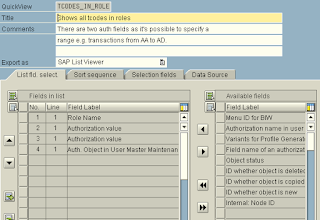
SAP transaction codes in roles

You can adjust the sort sequence on the “Sort Sequence” tab if you wish.

On the “Selection fields” tab, you can indicate which fields the user is able to use to narrow the query selection (set the predicates).

Save the query and then execute:

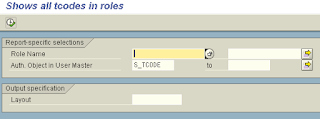
SAP transaction codes in all roles

On the previous screen, the option to generate the program exists:

Listing SAP transaction codes in roles

Choose the “Display report name” option (shown on the menu selection above) to then display the subsequently generated program name:

Now display the report source code in SE38:

You can now copy the report to your own “Z” report and modify as required.
This can then be transported.

WARNING: Since this report exposes detailed information on the structure of your roles, you should ensure that you secure it by assigning it to an authorisation group accordingly.

HowTo: Hide SAP tables including USR02

Within an SAP system, the user account passwords are hashed and stored in the SAP schema table USR02.
If the SAP system users have access to transaction SE16, then it’s possible for them to view the USR02 table by default.

This would present the user with the opportunity of seeing the password hash values.

It would be possible to spot a commonly used password hash and provided the user knows the actual password text that generated the hash, could use it to log in as a different SAP user, maybe with higher privileges.

More importantly, if the user manages to modify the table through transaction SM30, they could set their own hashes.

It is better to create a new authorisation group for the USR02 table, then exclude this specific auth group from the user roles via auth object S_TABU_DIS and setting the “Authorization Group” field.

An example would be to create a new authorisation group “ZZND” (zz no display) in transaction SE54.
Then, still in SE54, assign all the tables you do not wish anyone to see, to the new auth group.

Use transaction PFCG to edit your roles and change authorisation S_TABU_DIS, so that the field “Authorization Group” is set to a range “$*” to “ZY*” (it excludes ZZ*):


The next time the users try to access the table, they will receive a no authorization prompt in SE16.

UPDATE 30/05/2014: The post above was based on R/3 4.7.  Later releases may have an SC auth group already defined with the USR* tables, plus others, already defined.  You may still wish to create your own ZZND auth group to ensure continuity across upgrades and for your own standardisation practices if you must customise the list of tables in the auth group.  Thanks Matt.

HowTo: Find the Transaction Codes used in SPRO

It’s not easy trying to grant specific access to customising transactions when you;re not sure which ones will be required.

If you know they are accessible from SPRO, then you can find them using the following query, which lists TCODES from SPRO customising that has been performed after installation (note the date of 2001):

SELECT distinct cobj.tcode
FROM cus_actobj cobj,
cus_acth cacth
WHERE cobj.act_id = cacth.act_id
AND cacth.fdatetime > '20019999999999'
ORDER BY 1;