This blog contains experience gained over the years of implementing (and de-implementing) large scale IT applications/software.

SAP ASE – Blocking Factor Madness

I spent around a day looking into a performance issue with a specific peice of SQL in an ERP 6 system running on a SAP ASE database.
The system has recently been migrated from Oracle, so we were expecting issues with hints, however this didn’t seem to be an index choice issue.
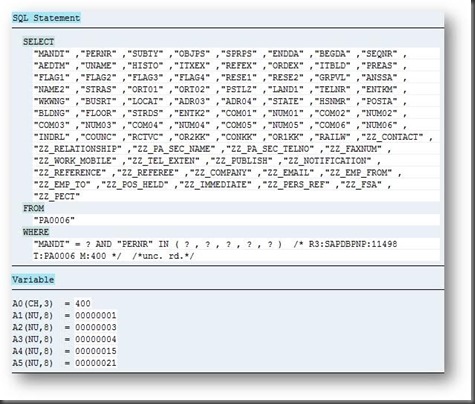
Look at the following two SQL statements, the first one is the system experiencing a performance problem:
e17933e9-cd69-4108-9924-3eb8e0b4900e

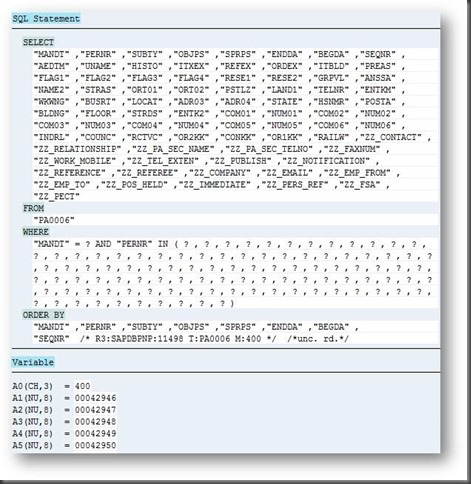
The second picture is a system where the performance issue doesn’t exist:
65731635-82b1-4893-90a0-bcc2bd00cf8e

Can you spot the difference?
Hint: Look at the number of question marks in the prepared statement.
The number of question marks indicate the number of items included in the “IN LIST” of the WHERE clause.

Since the ABAP SQL statement will be interpreted at the Kernel level, there is no way to see any difference in the ABAP layer other than this output from a SQL trace.
The consequence of the first statement (with fewer question marks) are that the SQL statement is executed multiple times in order to query for the same “PERNR” records.  This can result in as much as 4 to five times more effort for the SAP layer, plus the database layer.  Which adds more to the database response time and a little to the “processing time”.

What impacts the number of question marks?  Simple, the parameters “rsdb/*blocking_factor” at the Kernel level, will adjust how many parameters are fed into the prepared statement in the DBSL layer.

SAP Note 1996340 – SYB: Default RSDB profile parameters for SAP ASE  will provide all the answers.
The SAP note also answered my specific issue, which was why was one system in the landscape different.  The answer was that the production system (where the problem was seen) had it’s parameters mostly carried across during a migration from Oracle.  Whereas a smaller “release” system had it’s parameters left behind to die with the Oracle database.

As you will read in the SAP note 1996340, these rsdb parameters are pretty essential and should be re-evaluated when changing database platform.

Always re-evaluate all parameters when migrating from one platform to another.
Don’t assume that someone more experienced has set them with some future knowledge of the landscape/setup.

SAP ASE Job Server Error

Whilst administering a SAP ASE based SAP system, I came across an issue in the ASE Job server error log “JSTASK.log”:

00:140737306879744:140737340581728:2016/02/24 16:50:00.87 worker  ct_connect() failed.
00:140737306879744:140737340581728:2016/02/24 16:50:00.87 worker  jsj__RunSQLJob: jsd_MakeConnection() failed for user sapsa to server SID
00:140737306879744:140737340581728:2016/02/24 16:50:00.87 worker  jsj__RunSQLJob() failed for xid 66430
00:140737317369600:140737340581728:2016/02/24 16:55:00.87 worker  Client message: ct_connect(): protocol specific layer: external error: The attempt to connect to the server failed.

The issue was caused by a change of the sapsa user password whereby the SAP recommended method of using the hostctrl process, wasn’t followed.
The recommended method updates the sapsa user, the secure storage file plus also the external login for the Job Server.
This is mentioned at the very end of SAP note 1706410 (although it is suggested that the process in this note is no longer followed to change the passwords).
To fix the issue, follow finals steps in the SAP note 1706410:

isql -X -Usapsa -S<SID> -w999

use master
go
sp_helpexternlogin
go

Server                 Login                Externlogin
———————- ——————– ————
SYB_JSTASK             sapsa                sapsa

Drop the SYB_JSTASK entry:

exec sp_dropexternlogin SYB_JSTASK, sapsa
go

Re-create it with the new password:

exec sp_addexternlogin SYB_JSTASK, sapsa, sapsa, ‘<new sapsa password>’
go

This should fix the issue.

SAP ASE with SAP Replication Server – Node ID

While working on a SAP ASE database configured with SAP Replication Server (SRS) as part of a HADR pair, you may want to know how to identify which of the two databases in the HADR pair, you’re working on.

The only sure method I found is to query the @@nodeid global variable.
This nodeid value is different for each of the ASE databases.
Therefore if you’re logged onto the primary node, you will see a different ID.

I found this to be exceptionally useful when logging into a database as sapsso, since this user is redirected to the primary database in a HADR setup.


UPDATE: July 2016, I’ve since found this little gem:

> isql -Usapsa -S<SID> -w999 -X

1> select ASEHOSTNAME()
2> go

——————————-
SERVERHOSTNAME

(1 row affected)